Resolve ServiceNow incidents, requests, and requested items efficiently in Oomnitza.
By linking ServiceNow incidents, requests, and requested items with Oomnitza asset records, you can dynamically, monitor, track, and resolve ServiceNow tickets.
Linking Oomnitza asset records to ServiceNow tickets
To link Oomnitza records to ServiceNow, complete these steps:
- In ServiceNow, navigate to an incident, request, or requested item.
- Click the Oomnitza tab.
- Click the arrow in the dropdown list.
- Enter the details matching the asset in the Oomnitza fields and click Apply. Alternatively, search for the asset in the search bar. Hover the mouse over the asset and select the paperclip icon.
Tip
To remove the asset, click the paperclip icon.
Result: The ServiceNow issue is now linked to an Oomnitza record.
 Attaching assets to ServiceNow requests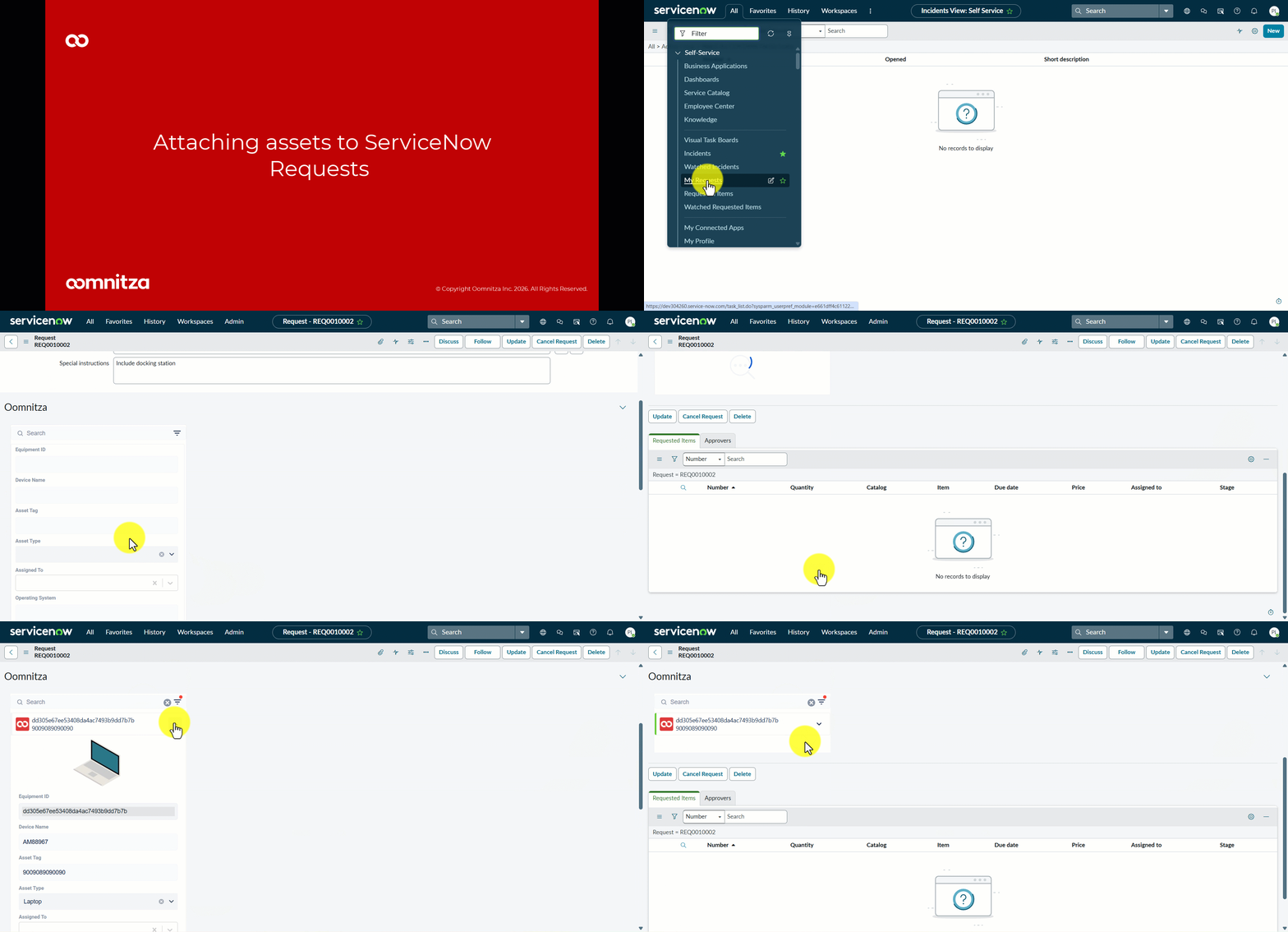
Viewing Oomnitza assets in ServiceNow tickets
- In ServiceNow, navigate to an incident, request, or requested item ticket. (If you have an active Oomnitza session open in your browser, you'll be automatically logged in. Otherwise, click Log in.)
- The list of Oomnitza assets is displayed in the Oomnitza tab. To view the details of an asset record, click the arrow in the dropdown list.
- To view the assets in Oomnitza, click View in Oomnitza.
Modifying an Oomnitza asset record in ServiceNow
The Oomnitza field must be defined as Editable.
- In ServiceNow, navigate to an incident, request, or requested item.
- In the Oomnitza tab, click the down arrow.
- Make your changes. (If it is a text field, enter the new information in the textbox, and then click outside the text box to update. If it is a dropdown field, scroll through the list and select a value.)
- Apply your changes.
Viewing ServiceNow tickets in Oomnitza
- In Oomnitza, click Hardware.
- Click a record.
- Click the Tickets tab, and then click the ServiceNow icon.
Result
All of the ServiceNow tickets that are associated with the asset record are displayed. You will see the status, creation date, description, and a link to the ticket in ServiceNow. To remove the link between the ServiceNow ticket and the Oomnitza asset record, click Delete .
Attaching a ServiceNow ticket to an Oomnitza asset
Comments
0 comments
Please sign in to leave a comment.